
Tutorials / Build a REST API with C# and .NET · Lesson 39 of 45
Frontend
On this page
The Login Page
Since protect endpoints and roles, the API refuses every request for data that has no token, and the pages have never logged in. The Books page shows one word, Unauthorized, above an empty table. This lesson is the first of two that teach the pages to log in. It builds the page that gets a token, and decides where the browser keeps it. The next lesson makes the other pages send it.
Our goal: a login page that gets a token from the API and keeps it, and a clear choice of where the browser keeps it.
Here is the route:
- Write the login page.
- Decide where the browser keeps the token. There are four places, and the choice matters.
- Try it as bob, with a wrong password and with the right one, and look at what the browser kept.
As before, the page is ugly on purpose: no styling, only the HTML and the script the job needs. Left out: sending the token with each request, which is sending the token. Also left out: staying logged in after the browser closes, tokens that renew themselves, and logging in with a cookie that scripts cannot read (named under step 2, not built).
This is the login page we build:
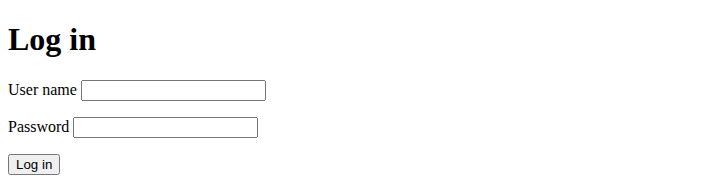
Where we are
This is the solution from the end of protect endpoints and roles. One file is new, in wwwroot:
BookShop/
  src/
    BookShop.Api/
      wwwroot/
        login.html                     <- NEW
Run every command from the solution folder, BookShop/. Keep the app running (dotnet run --project src/BookShop.Api) and refresh the browser after each edit. The table should hold the five sample books from reading books. The Books page is not touched in this lesson, and it goes on asking for the books with no token.
Here is what the login page does:
The finished file
Here is the page we are building, whole, to look at and not to type yet. The steps below explain each part, and the file comes back at the end, with questions.
<!DOCTYPE html>
<html>
<head>
  <meta charset="utf-8">
  <title>Log in</title>
</head>
<body>
  <h1>Log in</h1>

  <p id="message"></p>

  <form id="login-form">
    <p><label>User name <input name="userName"></label></p>
    <p><label>Password <input name="password" type="password"></label></p>
    <p><button type="submit">Log in</button></p>
  </form>

  <script>
    const form = document.getElementById('login-form');

    form.addEventListener('submit', async (event) => {
      event.preventDefault();

      const response = await fetch('/auth/login', {
        method: 'POST',
        headers: { 'Content-Type': 'application/json' },
        body: JSON.stringify({
          userName: form.elements.userName.value,
          password: form.elements.password.value
        })
      });

      if (!response.ok) {
        const problem = await response.json();
        document.getElementById('message').textContent = problem.title;
        return;
      }

      const answer = await response.json();
      sessionStorage.setItem('token', answer.token);
      sessionStorage.setItem('role', answer.role);
      sessionStorage.setItem('userName', form.elements.userName.value);
      location.href = '/';
    });
  </script>
</body>
</html>
The login page
Create src/BookShop.Api/wwwroot/login.html. The whole file is:
<!DOCTYPE html>
<html>
<head>
  <meta charset="utf-8">
  <title>Log in</title>
</head>
<body>
  <h1>Log in</h1>

  <p id="message"></p>

  <form id="login-form">
    <p><label>User name <input name="userName"></label></p>
    <p><label>Password <input name="password" type="password"></label></p>
    <p><button type="submit">Log in</button></p>
  </form>

  <script>
    const form = document.getElementById('login-form');

    form.addEventListener('submit', async (event) => {
      event.preventDefault();

      const response = await fetch('/auth/login', {
        method: 'POST',
        headers: { 'Content-Type': 'application/json' },
        body: JSON.stringify({
          userName: form.elements.userName.value,
          password: form.elements.password.value
        })
      });

      if (!response.ok) {
        const problem = await response.json();
        document.getElementById('message').textContent = problem.title;
        return;
      }

      const answer = await response.json();
      sessionStorage.setItem('token', answer.token);
      sessionStorage.setItem('role', answer.role);
      sessionStorage.setItem('userName', form.elements.userName.value);
      location.href = '/';
    });
  </script>
</body>
</html>
Most of it is the Books form from the Books screen, smaller:
type="password"makes the browser show dots instead of the letters. It changes only what is shown on screen: the password still travels as plain text in the request body. (On a live site, HTTPS encrypts the whole request on its way.)- The request is a
POSTto/auth/loginwith the JSON body the login endpoint expects,{"userName": ..., "password": ...}. - On failure the page shows the
titleof the Problem Details:Wrong user name or password.for a401, or the validation title for an empty form. - On success the page keeps three things in
sessionStorage(the next section explains it): the token, the role and the user name.setItem(name, value)stores a value under a name. location.href = '/'sends the browser to another address, here the Books page. It is the same as clicking a link.
This page uses plain fetch. The login request carries no token, and a 401 here means "wrong password". The next lesson writes a helper for the other pages, and says why this page does not use it.
Where to keep the token
The login page has the token, and then the browser leaves the page. The token has to survive that, so the Books page can find it. The browser has four places to keep it:
| Place | Survives a click to another page | Survives closing the tab | A script on the page can read it |
|---|---|---|---|
| A variable in the script | no | no | yes |
sessionStorage |
yes | no | yes |
localStorage |
yes | yes, until removed | yes |
A cookie marked HttpOnly |
yes | depends on the cookie | no |
A variable is out for us. As the report screen showed, a link loads another page, and its script starts from nothing. Our app is three separate pages, so the token would be lost at every click. (Apps built as one page that never reloads can keep it in a variable.)
sessionStorage and localStorage are two small stores the browser keeps for each site. They work the same way (setItem, getItem), and each site sees only its own. The difference is how long they keep things: sessionStorage forgets when the tab is closed, localStorage keeps everything until it is removed. On a shared computer at the shop counter, localStorage means the next person who opens the site is still logged in as the last one.
Both have the same weak spot: any script running on the page can read them. In the first web page, a book title with HTML in it showed how a stranger's script could end up on a page, and textContent kept it out. If such a script ever did get in, it could read the token and send it away, and a token works for whoever holds it.
A cookie marked HttpOnly fixes that: the browser keeps it and sends it with every request, and no script can read it at all. That is the safest place against a stolen token. But then the API must read the token from a cookie instead of the Authorization header, and cookies that the browser sends by itself need their own protection against other sites sending requests in your name. That is a different setup, and we leave it out.
We use sessionStorage: it survives the clicks between our pages, and it is gone when the tab is closed. Like localStorage, a script on the page could read it, so it relies on the page never letting a stranger's script in, which is why every page in this course writes data with textContent. This is a choice, and teams argue about it; the HttpOnly cookie is the stronger one when you can set it up.
Try it
Open the developer tools (F12) on the Network tab before each case, so you can watch the requests. Each case starts where the one before ended. The Books page is still the one from the Books screen lesson.
Case A: bob, with a wrong password
Open http://localhost:5101/login.html. Type bob and guess, and click Log in. The request body is:
{"userName":"bob","password":"guess"}
The API answers 401, and the page shows the title: Wrong user name or password. The page stays where it is. Nothing was kept: in the Console, sessionStorage.getItem('token') answers null.
Case B: bob, with his password
Now bob and bob-pass-1:
{"userName":"bob","password":"bob-pass-1"}
The login answers 200, and the browser goes to the Books page. The page shows Unauthorized above an empty table, as it did before this lesson. The login worked, and nothing sends the token yet.
Look at what the browser kept. In the Console:
sessionStorage.getItem('role')
'Staff'
sessionStorage.getItem('userName') answers 'bob', and sessionStorage.getItem('token') answers a long text that starts with eyJ: the token. The token is in the tab, waiting for a page to use it. That page is the next lesson.
Where we ended
Compare with your solution. One file is new:
BookShop/
  src/
    BookShop.Api/
      wwwroot/
        login.html                     logs in, keeps the token, role and name in sessionStorage
Here is the finished login.html, the same file as at the start of the lesson, to read once more before the questions:
<!DOCTYPE html>
<html>
<head>
  <meta charset="utf-8">
  <title>Log in</title>
</head>
<body>
  <h1>Log in</h1>

  <p id="message"></p>

  <form id="login-form">
    <p><label>User name <input name="userName"></label></p>
    <p><label>Password <input name="password" type="password"></label></p>
    <p><button type="submit">Log in</button></p>
  </form>

  <script>
    const form = document.getElementById('login-form');

    form.addEventListener('submit', async (event) => {
      event.preventDefault();

      const response = await fetch('/auth/login', {
        method: 'POST',
        headers: { 'Content-Type': 'application/json' },
        body: JSON.stringify({
          userName: form.elements.userName.value,
          password: form.elements.password.value
        })
      });

      if (!response.ok) {
        const problem = await response.json();
        document.getElementById('message').textContent = problem.title;
        return;
      }

      const answer = await response.json();
      sessionStorage.setItem('token', answer.token);
      sessionStorage.setItem('role', answer.role);
      sessionStorage.setItem('userName', form.elements.userName.value);
      location.href = '/';
    });
  </script>
</body>
</html>
Check your reading
You have now seen the whole login page. This is a practice round to read it back. The answers are folded away, so guess first. Nothing here is new: each answer comes from the sections above, and every "what happens" was tried on the real page.
What is this doing?
Read each line on its own and say what it does.
sessionStorage.setItem('token', answer.token);
Show answer
It keeps the token that the API sent back, under the name token, in this tab's session storage, where the other pages of the site can read it.
body: JSON.stringify({ userName: form.elements.userName.value, password: form.elements.password.value })
Show answer
It reads the two boxes, makes them into one object, and turns it into the JSON text that goes in the body of the request, as the login endpoint expects.
location.href = '/';
Show answer
It sends the browser to the address /, the Books page, as if the visitor had clicked a link.
Why is it written this way?
Each of these has a reason, and the lesson gave it.
- Why does the page show
problem.titlewhen the login fails?
Show answer
Every refusal from the API has a title. For a wrong password it is Wrong user name or password., which is already in plain words for the visitor.
- Why does the page keep the role and the user name, and not only the token?
Show answer
The role came with the login answer, and the pages after this one need it, for example to show who is logged in and to decide what the menu shows. The page keeps it now, since it will never get another chance to read the answer.
In what order?
- Put these four in the order they happen when bob logs in: (a) the browser goes to the Books page, (b) the login page sends
POST /auth/login, (c) the login page keeps the token, role and name insessionStorage, (d) the API answers200with a token and a role.
Show answer
b, d, c, a. The request is sent and answered, the answer is kept, and only then does the browser leave the page.
What happens if...
Each change below was tried on the real page.
- bob types the wrong password?
Show answer
The API answers 401, the page shows Wrong user name or password. and stays on the login page. Nothing is kept: sessionStorage.getItem('token') answers null.
- You delete the line
location.href = '/';?
Show answer
The login still works and the token is kept, but the browser stays on the login page, and nothing on the screen says that anything happened.
Find the mistake
- After a correct login,
sessionStorage.getItem('token')answers'[object Object]'. What is wrong with this line?
sessionStorage.setItem('token', answer);
Show answer
answer is the whole login answer, an object with a token and a role, and storage keeps text, so the object was turned into the useless text [object Object]. The line should store answer.token.
Recap
- The login page sends the user name and password to
POST /auth/login, and keeps the token, the role and the name insessionStorage. - A token can live in a variable (lost at each page change),
sessionStorage(until the tab closes),localStorage(until removed) or anHttpOnlycookie (no script can read it). We chosesessionStorage; a script on the page could read it, so the pages must keep writing data withtextContent. - A wrong password gives a
401and the page shows the API's title. A right one gives a200and the browser goes to the Books page. - Keeping the token is not the same as sending it. After the login, the Books page still shows Unauthorized, because nothing adds the token to its requests yet.
Questions to think about
Each question has its answer folded away underneath. Guess first, then open it to check.
- Why can the token not be kept in a variable in our pages?
Show answer
Every link loads a new page, and the new page's script starts from nothing. The token would be lost at the first click.
- What is the risk of keeping a token where a script can read it?
Show answer
If a stranger's script ever gets into the page, it can read the token and use it, because a token works for whoever holds it. Writing data with textContent is what keeps such scripts out.
- The login worked, and the Books page still says Unauthorized. Why?
Show answer
The page keeps the token but does not send it. Its requests carry no Authorization header, so the API answers 401. The next lesson changes that.
Next lesson: sending the token, where the Books and report pages send the token with every request, and the menu follows the role.