
1. Design the Form.
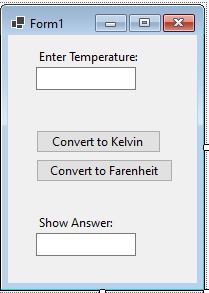
2. Create the Model Class.
In this case, I name the model class InputNumber. I write a method called Conversion which I will use later.
namespace ExampleActivityFarenheitConverter
{
    class Conversion
    {
        public double varUserInput;
    }
}
3. Create Controller (Form Class).
It is not recommended to write the computation or calculations in our Controller Class this is because those work will have to do by another class which focuses more in processing input to produce certain output.
For this example, I wrote the calculations in the specific methods: ConvertToKelvin and ConvertToFarenheit.
Conversion ConversionFarKel = new Conversion();

public Form1()
        {
            InitializeComponent();
            textResult.Clear();
        }

 private void conversion()
        {
            ConversionFarKel.varUserInput = Convert.ToDouble(textInput.Text);
        }
private void ConvertToKelvin(Conversion convertedResult)
{
textResult.Text = (convertedResult.varUserInput + 273).ToString();
}
private void ConvertToFarenheit(Conversion convertedResultFar)
        {
            textResult.Text = (convertedResultFar.varUserInput * 18 / 10 + 32).ToString();
        }
Take Note: CONVERSION BUTTONS.
private void btnConKelvin_Click(object sender, EventArgs e)
        {
            conversion();
            ConvertToKelvin(ConversionFarKel);
        }
private void btnConFar_Click(object sender, EventArgs e)
{
conversion();
ConvertToFarenheit(ConversionFarKel);
}